
Download Documents
Datasheet (EN)
PDF · 0.8 MB
Spec Sheet (EN)
PDF · 0.3 MB
User Manual V2.3 (EN)
PDF · 3.5 MB
User Manual V2.3 (KR)
PDF · 3.7 MB
Overview
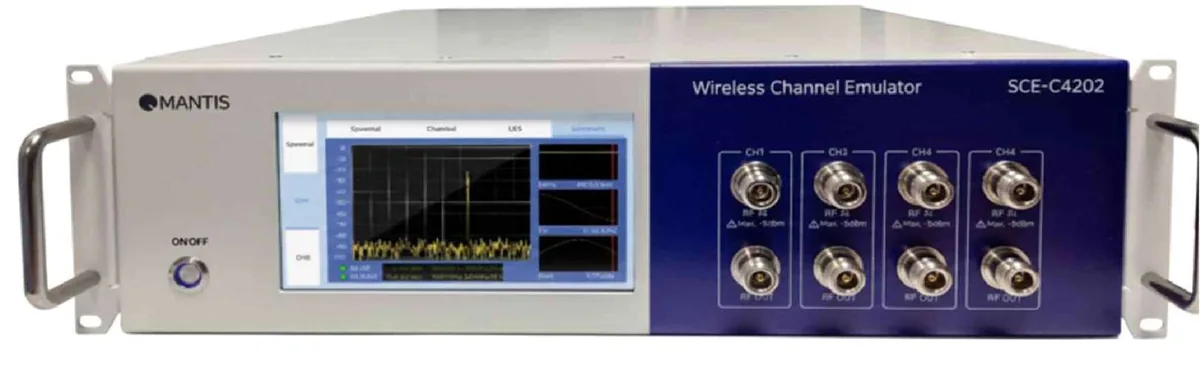
The SCE-C4202 is a two-channel wireless channel emulator that applies delay, Doppler (frequency offset), gain, additive white Gaussian noise (AWGN) and multipath fading to an RF signal in real time. It reproduces GEO satellite, LEO satellite, fixed base station and mobile station link conditions in a controlled laboratory environment, over 200 to 2100 MHz with up to 600 MHz of bandwidth per channel.
Each channel is configured independently, so CH1 and CH2 can emulate the uplink and downlink of the same link. Parameters are entered on the 7-inch touch screen, and the built-in spectrum view shows the input and output signals together with live Delay, FO and Gain curves. Profiles are prepared on a PC, copied to a USB memory stick and loaded through the front-panel USB port. The instrument is a 19-inch rack-mount unit with an external 10 MHz reference clock input.
| 2 independent channels (CH1 / CH2) | Delay 16 µs – 500 ms, 1 ns steps |
| RF range 200 – 2100 MHz | Frequency offset ±10 MHz, 1 Hz steps |
| Up to 600 MHz bandwidth per channel | Gain −20 to +20 dB · AWGN −150 to −100 dBm/Hz |
Key Features
- Four emulation modes: Fixed, Satellite LEO, Profile, Fading Channel
- Dynamic delay, Doppler and gain driven by profiles of up to 1024 lines
- SYNC RUN to start different profiles on a single timing, LOOP for repeated runs
- Multipath fading (Rayleigh / Rician) with up to 24 taps
- Real-time spectrum view with Delay / FO / Gain curves
- Channel status indicators and 10 MHz reference clock input
Applications
- GEO satellite link emulation (fixed delay)
- LEO satellite pass emulation (delay, Doppler, path attenuation)
- Fixed base station link emulation
- Mobile station channel emulation
- Multipath fading tests (Rayleigh / Rician)
- Uplink / downlink emulation using two channels
Channel Emulation Modes
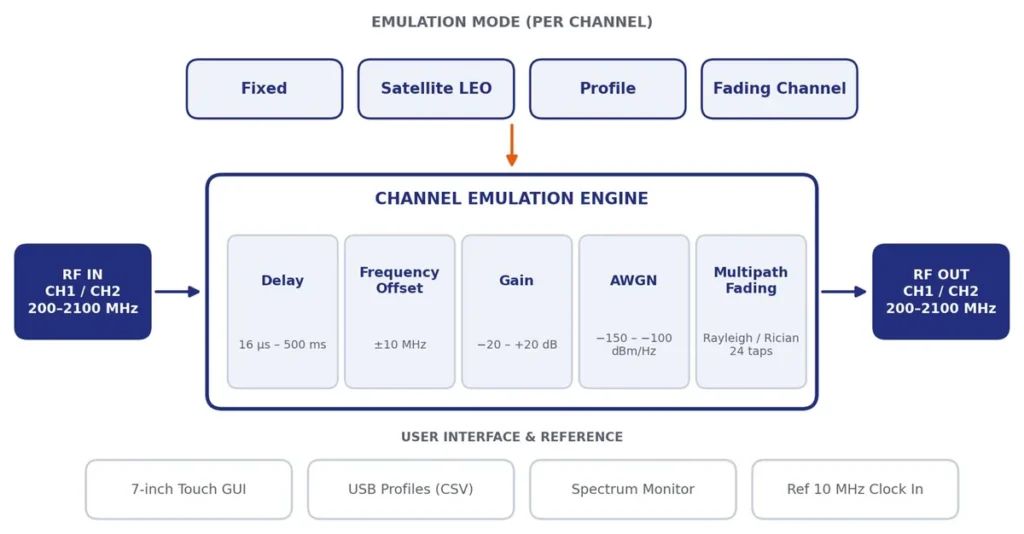
- Fixed – static delay (16 µs to 500 ms in 1 ns steps), frequency offset, gain and AWGN, suited to GEO and fixed-station links.
- Satellite LEO – time-varying delay, Doppler and distance-related attenuation derived from the satellite altitude and service angle.
- Profile – user-defined Delay, Frequency Offset and Gain profiles played from CSV files for GEO, LEO, fixed-station and mobile-station scenarios.
- Fading Channel – Rayleigh or Rician multipath profiles of up to 24 taps.
Satellite LEO Mode
Enter the satellite altitude and the service angle, and the emulator generates the delay, Doppler and distance-related attenuation profile of a low-earth-orbit pass, assuming a spherical earth. The signal frequency sets the Doppler reference, and the computed satellite speed, service time and maximum Doppler are displayed before the run starts.
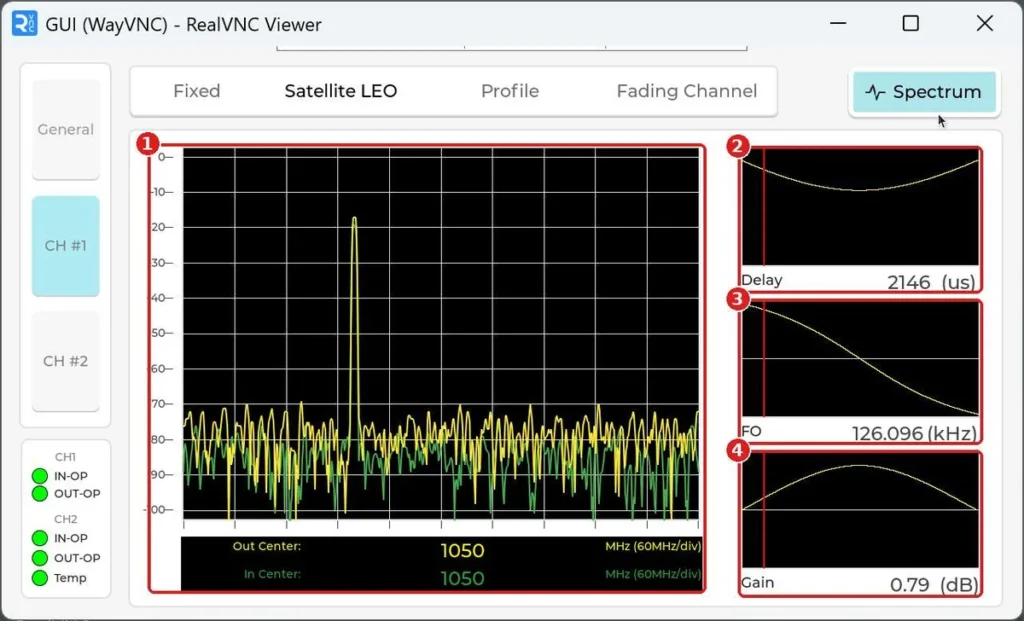
With CH Sync enabled, the same altitude and angle profile is applied to CH2 at its own frequency, which is convenient for uplink and downlink testing. Progress of the pass is shown on the Spectrum screen as Delay, FO and Gain curves with a moving position marker.
Profile and Fading Modes
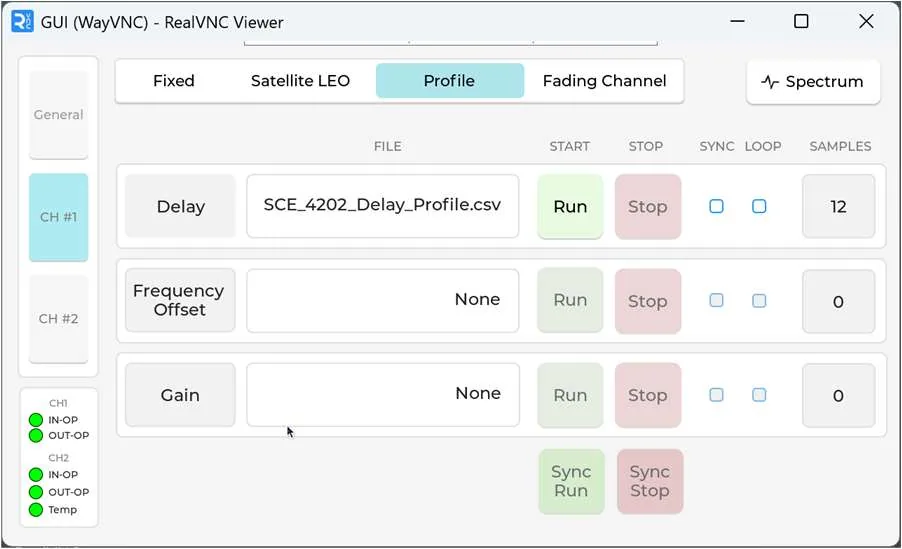
Profile mode loads standard CSV files for Delay, Frequency Offset and Gain, each with up to 1024 lines and a period in milliseconds per line. Profiles can be run individually, started together with SYNC RUN, or repeated with LOOP. Files in the wrong format are rejected with an E-1 indication.
Fading Channel mode applies a Rayleigh or Rician distribution with up to 24 taps, each defined by delay, gain and maximum Doppler. Fading is configured through a profile file, and the resulting tap table is shown on screen.
Simple Workflow
Select the mode on the touch GUI, enter values with the on-screen keypad, and press Apply or Run. For dynamic scenarios, create a CSV profile on a PC from the provided template, save it to a USB memory stick, plug it into the front-panel USB port and choose it with File Open. The Spectrum screen then confirms the applied delay, frequency offset and gain while the emulation runs.
Specifications
| Item | Specification |
|---|---|
| General | |
| Number of channels | 2 independent channels (CH1, CH2) |
| Emulation modes | Fixed, Satellite LEO, Profile, Fading Channel |
| Display | 7-inch touch screen |
| RF | |
| RF input / output frequency | 200 to 2100 MHz |
| Bandwidth | Up to 600 MHz per channel |
| RF input level | 0 dBm max |
| RF output level | −10 dBm max |
| Signal ports | 2 input and 2 output channels (2 additional dummy channels; CH3 / CH4 are used on the SCE-C4400 only) |
| Delay | |
| Range / resolution | 16 µs to 500 ms / 1 ns |
| Dynamic delay | Profile-based, in Satellite LEO and Profile modes |
| Profile initial delay range | 16,000 to 500,000,000 ns |
| Frequency Offset | |
| Range / resolution | ±10 MHz / 1 Hz |
| Offsets beyond ±10 MHz | Set different input and output frequencies on the General tab |
| Profile initial FO range | −10 to 10,000,000 Hz |
| Gain | |
| Fixed gain | −20 to +20 dB (within the −10 dBm maximum output level) |
| Dynamic gain control | −20 to +20 dB, profile-based |
| Profile initial gain range | −20.00 to +20.00 dB |
| AWGN | |
| Noise density range | −150 to −100 dBm/Hz (default −150 dBm/Hz) |
| Satellite LEO Mode | |
| Satellite altitude | Typically 300 to 2000 km |
| Service angle | 10° to 80° above the horizon |
| Signal frequency (Doppler reference) | 100 MHz to 40 GHz |
| Second channel | CH Sync applies the same altitude and angle profile to CH2 at its own frequency |
| Computed values | Satellite speed, service time, maximum Doppler |
| Example | 500 km, 43°, 8250 MHz: 7.61 km/s, 135.55 s, 141,538.05 Hz maximum Doppler |
| Live display | Delay, FO and Gain curves with progress marker |
| Profile Mode | |
| Profile types | Delay, Frequency Offset, Gain (CSV files) |
| Profile length / time base | 1 to 1024 lines / period per line in ms |
| Run control | Individual RUN / STOP, SYNC RUN, LOOP |
| Loading | USB memory stick via the front-panel USB port |
| Format check | Mismatched files are flagged E-1 and cannot be run |
| Fading Channel Mode | |
| Distribution | Rayleigh, Rician |
| Number of taps | Up to 24 |
| Tap parameters | Delay (ns), Gain (dB), Max Doppler (Hz) |
| K factor | Rician only (K = 0 in the profile selects Rayleigh) |
| Configuration | Profile file (CSV) |
| Control and Interfaces | |
| Local control | 7-inch touch GUI with on-screen keypad |
| Spectrum display | Input and output spectrum, 60 MHz/div |
| Status indicators | CH1: IN-OP, OUT-OP; CH2: IN-OP, OUT-OP, Temp |
| Ports | Ethernet (admin), USB-A, USB-C (admin), Optical (admin), Ref 10 MHz Clock In |
| Power and Mechanical | |
| Input voltage | 110/220 VAC (AC 115 to 230 V) |
| Power consumption | 150 W max |
| Dimensions (W × H × D) | 476.0 × 132.0 × 546.5 mm |
| Weight | 6.5 kg |
| Mounting | 19-inch standard rack |
| Warranty | 1 year from the date of purchase |
Interfaces and Mechanical
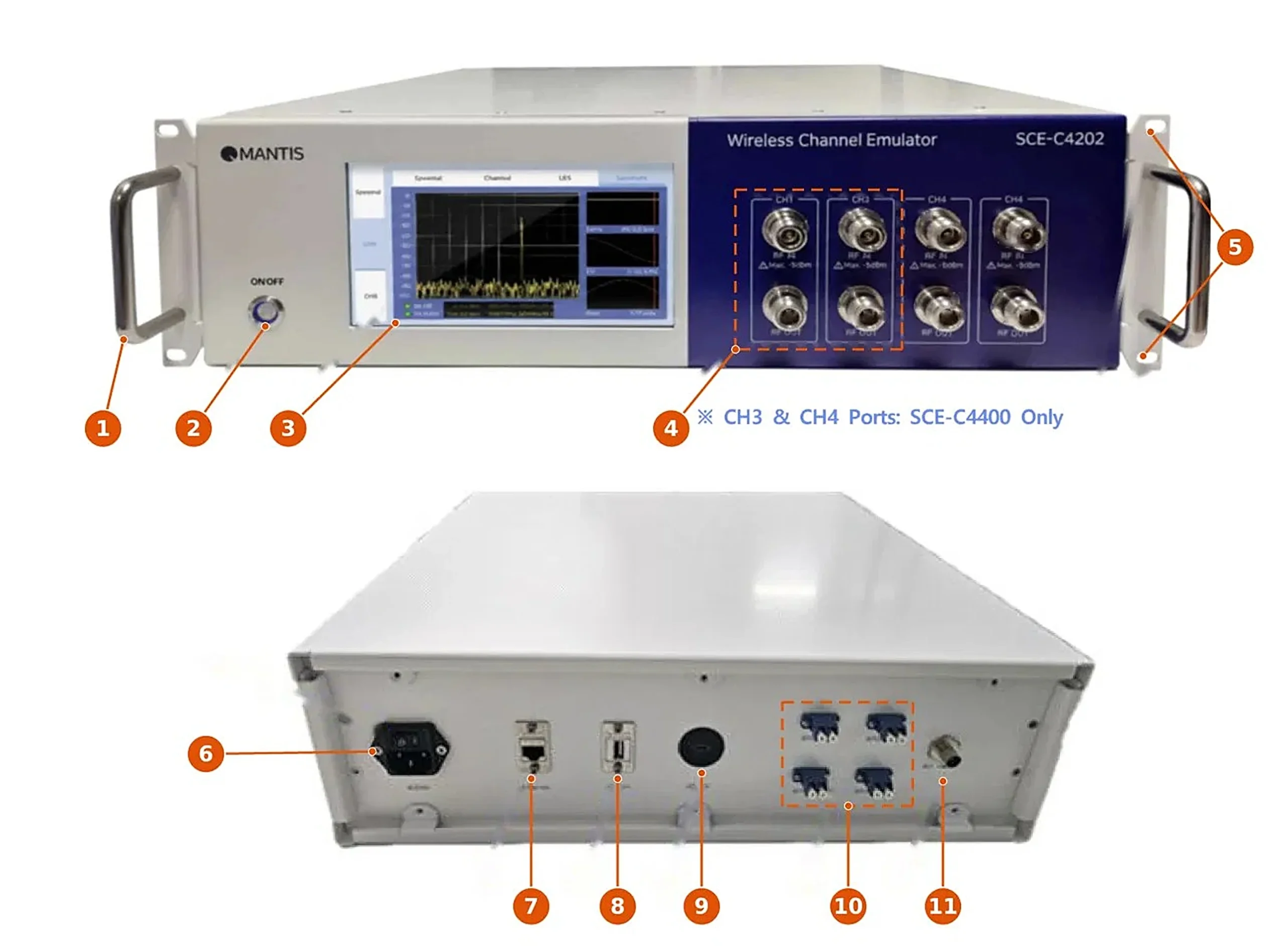
- Handle
- Power ON/OFF switch
- Touch GUI (function selection, status)
- Analog signal input / output ports
- 19-inch rack mounting holes
- AC power input (115–230 V) with switch
- Ethernet (admin port)
- USB A
- USB C (admin port)
- Optical port (admin port)
- Ref 10 MHz Clock In
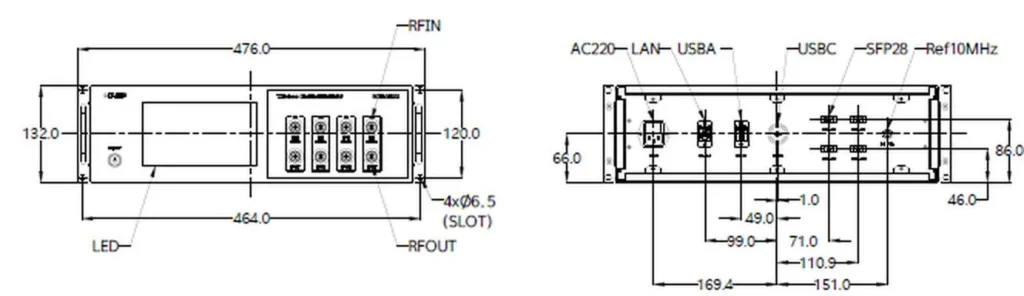
Package contents: SCE-C4202 unit, power cable, Ethernet cable, user manual.
© 2025 Mantis Technology Co., Ltd. All Rights Reserved.